AGENTS
Move faster.
- Create first drafts quickly
- Make deal-specific updates
- Collaborate with Marketing
- See where work stands
COMMERCIAL REAL ESTATE MARKETING SOFTWARE
Create and manage OMs, brochures, flyers, maps, social content, email campaigns, newsletters, and more from one Marketing Center—so your team markets listings faster, stays on brand, and knows what to work on next.
ONE LISTING
CREATE
REVIEW & APPROVE
LAUNCH
TRACK & OPTIMIZE
One listing. Every marketing asset. One consistent brand.
MARKETING CENTER
Create, manage, and track the marketing behind your listings from one workspace.
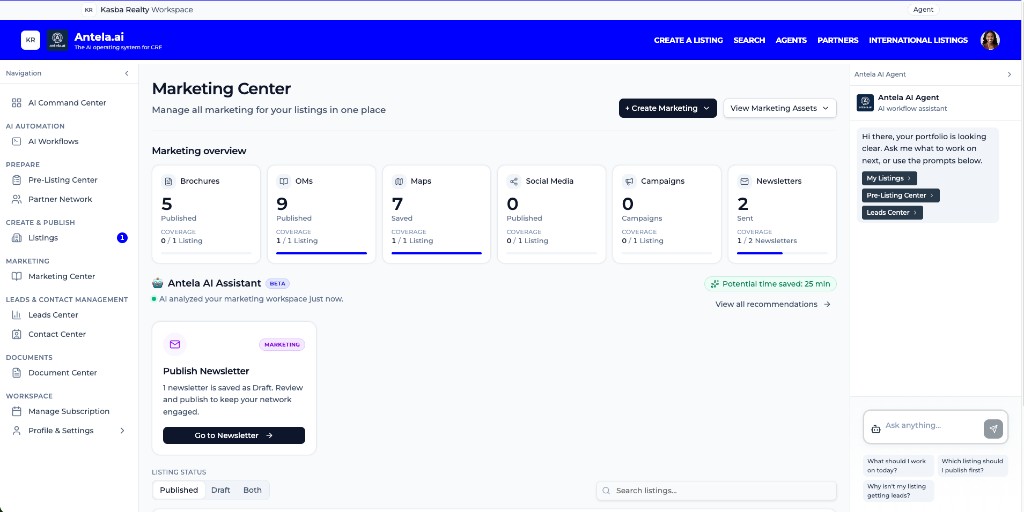
Brochure/Flyer, OMs, maps, social media, campaigns, and newsletters live in one Marketing Center.
See published, ready, draft, and saved work without hunting across different tools.
Understand which listings have marketing assets and where work may still be needed.
Antela AI analyzes listing activity and helps surface recommended marketing actions.
Don't just create marketing.
Run marketing from Antela.
CRE marketing teams shouldn't have to move the same property information through Word, Canva, email tools, map tools, social tools, and shared drives every time they launch a listing.
TRADITIONAL WORKFLOW
WITH ANTELA
One property.
One source of truth.
Every deliverable.
Use connected property information across the marketing workflow instead of rebuilding the same deal in disconnected tools.
2–3 DAYS → MINUTES
Customer-reported experience — not an Antela-wide benchmark.
TRADITIONAL WORKFLOW
WITH ANTELA
“Our traditional workflow involves manual form submissions and a standard two-to-three-day turnaround to get a marketing draft back. Antela.ai completely redefines this process by pulling property data straight from our CRM to instantly generate a suite of beautifully branded marketing materials in minutes.”
CREATE
Create investor-ready OMs with property information, financials, demographics, maps, photos, and brokerage branding.
Learn more →Turn listing information into polished property collateral without rebuilding layouts from scratch.
Learn more →Create location and amenities visuals for OMs, brochures, and campaigns.
Turn property information and imagery into property marketing video.
DISTRIBUTE
Turn the listing into an outbound email campaign.
Learn more →Create branded listing roundups and market communications.
Learn more →Create property-specific social content using the same listing context.
Learn more →CONTROL
Maintain brokerage logos, colors, agent information, disclaimers, and presentation standards.
Learn more →Move marketing assets from draft through ready and published—with room to review and customize before anything ships.
Keep marketing materials organized around the listing.
CONNECTED MARKETING
Source
LISTING
Create once. Market everywhere.
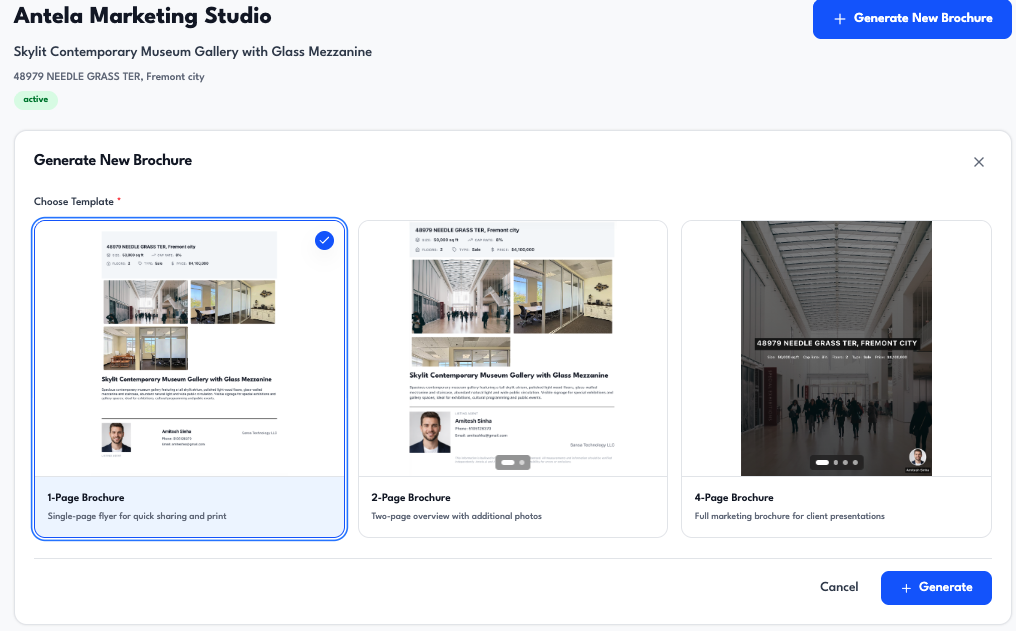
Stop recreating the property for every channel.
The listing becomes the foundation for the marketing that follows—helping teams move from property information to a complete campaign faster.
Give agents the speed to move deals forward while giving Marketing the visibility and control to protect the brokerage brand.
AGENT
MARKETING
PUBLISH
No emailing PDFs back and forth.
No wondering which version is final.
Create → Review → Customize → Publish
AGENTS
MARKETING
LEADERSHIP
Agents move faster.
Marketing scales further.
The brand stays consistent.
BRAND CONTROL
AI should accelerate production—not turn every broker into their own design department.
CONSISTENT
AI accelerates production.
Marketing stays in control.
Marketing teams shouldn't have to manually inspect every listing to determine what needs attention.
Antela doesn't just help create the work.
It helps surface what work needs attention.
Antela can estimate the time saved through marketing work completed in the platform, helping teams understand the operational impact of faster execution.
Track estimated time reclaimed through faster marketing execution.
Less time producing collateral.
More time winning listings, serving clients, and closing deals.
BEFORE THE LISTING
Help agents walk into owner meetings with professional, consistent materials—then carry the property and brand context into the marketing that follows.
Create faster.
Present consistently.
Help win more listings.
“What stands out about Antela.ai is how much of the broker's workflow it brings together in one place. Agents can prepare a BOV and marketing pitch to help win the listing, then turn that same property information into the listing, OM, brochure, and marketing campaigns in minutes. Instead of moving between different systems and repeatedly entering the same information, agents can focus more of their time on clients, relationships, and closing deals.”
Create Fast. Customize Easily.
“I'm really happy with the marketing materials Antela has created for us. The flyer looks great, and the ability to quickly make updates and incorporate our team's information makes the process incredibly easy.”
Generate quickly, then make the deal-specific changes your team needs before the asset goes out.
Give Marketing a faster way to revise deal materials as property information changes—regenerate or edit assets from the listing context instead of rebuilding from scratch.
Design tools help you create something.
Antela helps your brokerage run the marketing workflow around the listing.
CUSTOMER PROOF
MARKETING SPEED
Our traditional workflow involves manual form submissions and a standard two-to-three-day turnaround to get a marketing draft back. Antela.ai completely redefines this process by pulling property data straight from our CRM to instantly generate a suite of beautifully branded marketing materials in minutes.
BROKER EXPERIENCE
I'm really happy with the marketing materials Antela has created for us. The flyer looks great, and the ability to quickly make updates and incorporate our team's information makes the process incredibly easy.
AI + PRODUCTIVITY
Antela.ai has helped us explore how AI can streamline commercial real estate workflows that traditionally require significant manual effort. The platform has demonstrated the potential to reduce time spent creating marketing materials, organizing listing information, and supporting broker productivity. We believe workflow automation and AI-assisted execution can help brokerages operate more efficiently, allowing agents to spend more time serving clients and building relationships.
CONNECTED WORKFLOW
What stands out about Antela.ai is how much of the broker's workflow it brings together in one place. Agents can prepare a BOV and marketing pitch to help win the listing, then turn that same property information into the listing, OM, brochure, and marketing campaigns in minutes. Instead of moving between different systems and repeatedly entering the same information, agents can focus more of their time on clients, relationships, and closing deals.
CRE marketing software should produce OMs, brochures, and campaigns from the same listing data your CRM and documents use. Continue into related pillars and competitive pages.
Guides
When useful context lives only inside finished artifacts, the next task starts with archaeology. The durable unit is the property.
Most CRE teams do not lose the most time writing the first draft. They lose it in the handoffs, re-entry, and revision work that happens before and after.
A price change is one line. The real cost of a CRE marketing update is the coordination tax it triggers across the OM, brochure, campaign, and listing page.
A practical buyer's guide to commercial real estate marketing software: the capabilities that matter, pricing models, pilots, and buying mistakes.
A practical guide to automating commercial real estate marketing: listing data, document production, distribution, follow-up, and human review.
A phase-by-phase commercial real estate marketing checklist covering intake, asset production, launch, follow-up, and closeout for every listing.
CRE marketing software helps brokerages produce and distribute listing marketing—offering memorandums, brochures, maps, email, newsletters, social, and marketing video—from listing data, with brand templates and a shared Marketing Center workspace.
Design tools create graphics. Marketing Center is built around the CRE listing, allowing teams to reuse property information across marketing workflows instead of rebuilding each asset from scratch—while keeping brokerage branding consistent.
Yes. Teams generate branded OMs and brochures from listing information, review and customize, then extend the same listing into maps, email, social, newsletters, and marketing video. See our offering memorandum software page for OM-specific depth.
Yes. Email campaigns, newsletters, and social creatives are part of the marketing stack so distribution stays tied to the same property facts as your OM and brochure.
Commercial brokerages, marketing teams, and agents who need faster listing launches without losing brand control—especially teams replacing fragmented tool stacks or evaluating a Buildout alternative.
Start with our commercial real estate marketing guide for the practice, then use the CRE marketing resources cluster for buyer’s guides, automation playbooks, and campaign checklists.
Give agents the speed they want. Give Marketing the control it needs. Turn property information into the marketing package without rebuilding the same deal across disconnected tools.
One listing.
Every marketing asset.
One consistent brand.