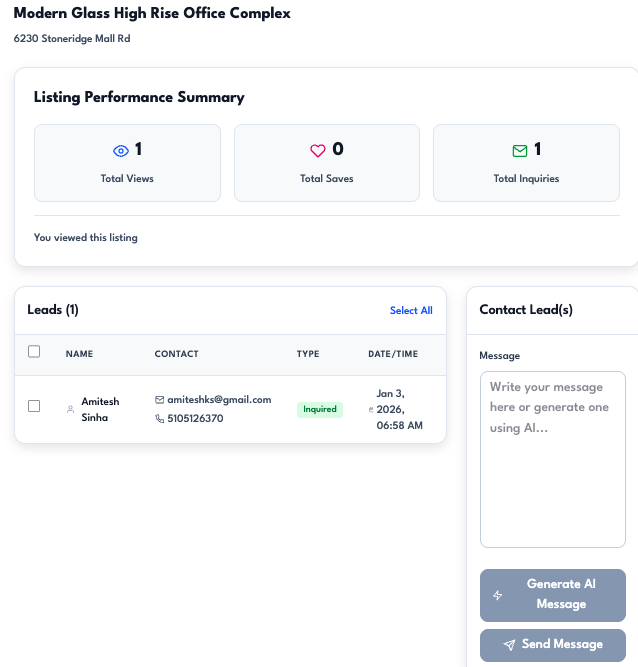
Leads Center
Capture, qualify, and follow up on leads in one place — with AI scoring and message generation so you focus on the hottest opportunities.
Leads Center brings every inquiry and engagement from your listings into a single view. See who viewed, saved, or inquired on each property; sort by Antela AI Score (hot, active, or passive) to prioritize high-intent leads; update status and track last contact; and send messages in bulk with optional AI-generated or AI-refined copy. The same AI that powers listing creation and discovery helps you qualify and respond—so you spend less time on low-intent traffic and more time closing deals.
How it works
- View leads by listing or across all properties — Open Leads Center and pick a listing to see only that property's leads, or view all leads in one list. Each row shows name (or masked details for standard tiers), email, lead type (viewed, saved, inquired), date, status, last contacted, and AI score.
- Prioritize with the Antela AI Score — Every lead gets a score from 20–100 and a band: hot (high intent, e.g. reached out or strong recent engagement), active (moderate engagement), or passive (lower or older activity). Sort by "Antela AI Score (highest first)" to surface the best opportunities, or sort by last contacted or status.
- Update status and send messages — Set status per lead (New, Contacted, Interested, Do not contact, One-time buyer, Investors). Select one or more leads and send an email; use a template or write your own. The AI can generate a property-specific message or refine your draft so outreach stays on-brand and relevant. Sent messages are recorded so the lead shows as Contacted in Leads Center.
Lead types and status
Leads are captured when someone views, saves, or inquires on a listing. You can track view count, inquiry count, message count, and last activity. Agent-side status lets you move leads through your pipeline: New → Contacted → Interested (or Do not contact, One-time buyer, Investors). Last contacted date is updated when you send a message so you can sort and filter by follow-up timing.
Partners get a lead-centric view with filters for Inquired vs Viewed, so you can manage inbound interest from your partner pages in the same place.
Where to use it
Open Leads Center from the app sidebar or dashboard (e.g. "Review N Lead(s)", "Leads Reviewed" in workflow progress). You can also jump from a listing's Property Details → Insights panel to see that listing's leads and link through to Leads Center. The AI Command Center supports lead intents: say "My Leads" or "High-Intent Leads" to list or focus on leads. Leads Center is available for agent and partner accounts; it is not available for international lister accounts.
Leads Center is part of Antela's workflow coverage for agents and brokerages—from listings and marketing to capturing, scoring, and following up on leads so you close more deals.
Ready to get started? Explore plans or talk to our team.